Multi-Location GBP Strategy: How to Scale Google Business Profile SEO Across Multiple Locations

Managing one Google Business Profile takes time. Managing dozens — or hundreds — across different cities, regions, or franchisees is an entirely different challenge that most businesses underestimate until things start going wrong. Inconsistent business names, duplicate listings, unanswered reviews, generic descriptions, and missing location pages are the four most common reasons multi-location businesses fail to rank competitively in Google Maps — even when they have a dominant brand.
But scaling local SEO across multiple locations is also one of the highest-leverage opportunities in digital marketing. Get it right and you multiply your inbound lead volume proportionally with every new location you add.
This guide covers everything you need to build, standardize, and scale a multi-location GBP strategy — whether you are managing 5 locations or 500.
💡 Internal link opportunity: Link ‘Google Business Profile’ to your ‘What is GBP?’ explainer article.
Quick Answer: What Is a Multi-Location GBP Strategy?
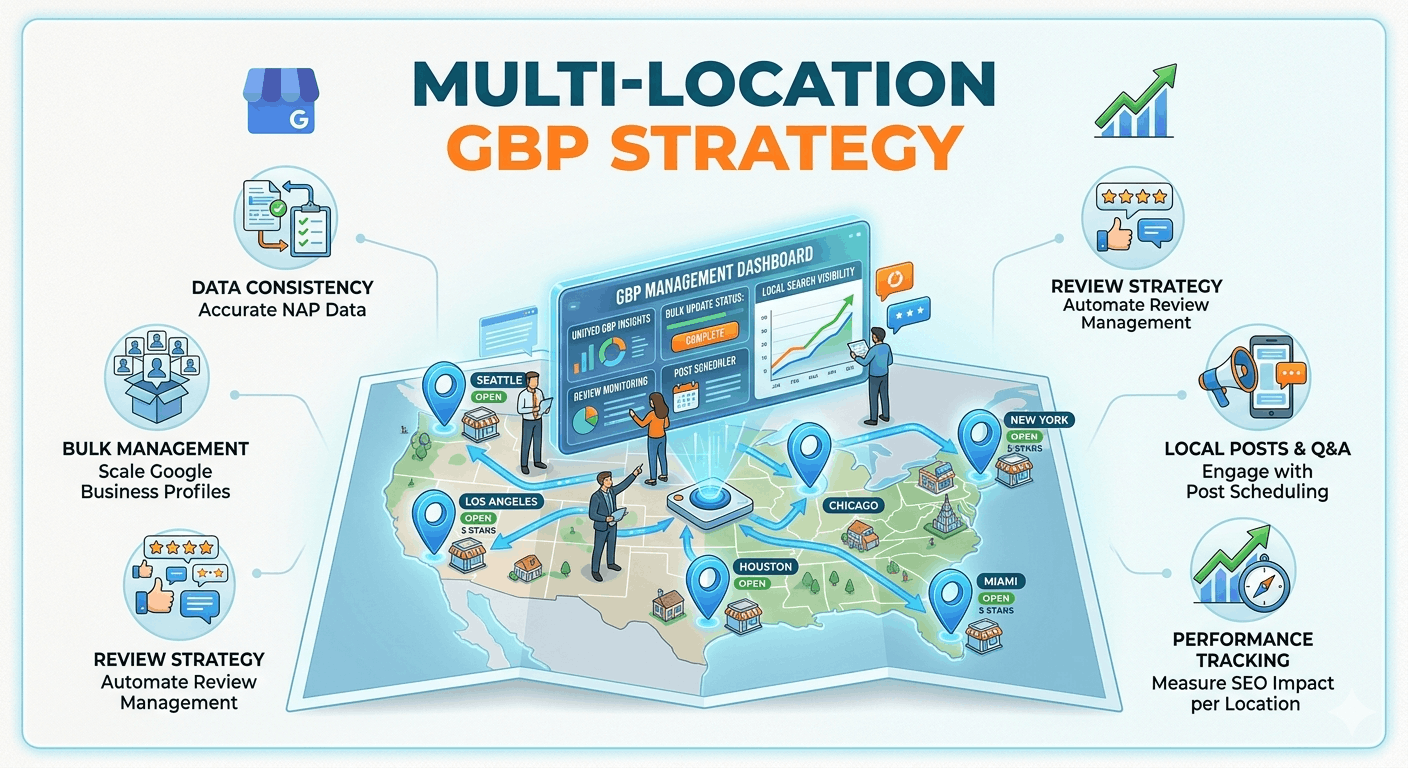
A multi-location GBP strategy is a structured framework for creating, optimizing, and maintaining separate Google Business Profile listings for every eligible business location — while balancing brand consistency with genuine local relevance for each site. The most important success factors are: centralised governance (so nothing inconsistent slips through), unique local content per profile (so Google treats each listing as genuinely distinct), a scalable review system, and dedicated location landing pages on your website.
| Pillar | What It Means | Key Actions |
| Governance | Centralised control with local accountability | Set up Business Groups, assign location managers, document standards |
| Consistency | Brand-level elements identical across all locations | Same categories, attributes, NAP format, core services |
| Localisation | Location-specific content that resonates locally | Unique descriptions, local photos, community posts, local FAQs |
| Review Management | Scalable acquisition and response workflows | Per-location targets, templated response library, escalation paths |
| Location Pages | Unique, SEO-optimised website pages per location | Distinct URL, local keywords, embedded map, local schema, FAQs |
| Reporting | Per-location and network-wide performance tracking | Monthly KPI dashboards, Local Falcon geo-grids, GA4 attribution |
When Does a Business Need Multiple GBP Listings?
Google’s guidelines are clear: each physical location that is separately staffed and customer-accessible is eligible for its own GBP listing. Here is how the rules apply across common business models:
| Scenario | GBP Eligibility | Notes |
| Separate physical locations | ✅ Eligible — create one profile per location | Each must have a unique, verified address |
| Staffed customer-facing office | ✅ Eligible — must be permanently staffed during hours | Staff must be present during claimed hours |
| Service-area business (SAB) | ✅ Eligible — hide address, define service areas | Do not show address for SABs; max 20 service areas per profile |
| Franchise / licensed location | ✅ Eligible — each franchisee gets their own GBP | Brand-level access can be managed through Business Groups |
| Virtual office / hot desk | ❌ Not eligible — no genuine staffed presence | Using a virtual office address will trigger suspension |
| Shared address (same suite) | ⚠️ Needs unique department or practitioner name | Identical address + identical name = duplicate and suspension risk |
| P.O. Box address | ❌ Not eligible — not a physical location | P.O. Boxes cannot be used as GBP addresses |
⚠️ Creating GBP profiles for ineligible locations (virtual offices, P.O. boxes, unstaffed sites) is the most common cause of multi-location GBP suspensions. Audit all existing profiles against these criteria before scaling.
Build a Strong Foundation
Centralised Governance
Before optimizing a single profile, establish who is responsible for what. At the brand level, a central team (or agency) should own: category selection, naming conventions, bulk verification, and access management. Location managers should own: local content, reviews, posts, and hours updates.
Location Ownership via Business Groups
Use Google’s Business Groups feature to manage multiple locations under one organization account. This allows you to grant location-level access to franchisees or location managers without giving them brand-level control. Every location should be claimed, verified, and assigned to the correct Business Group before any optimization work begins.
User Access Controls
Assign roles carefully. The ‘Owner’ role should be reserved for brand HQ accounts. Location managers should be assigned ‘Manager’ access — enough to update hours, post, and respond to reviews, but not to transfer ownership or delete the listing.
📊 Scale tip (5 locations): Manage access manually via GBP Manager. (50 locations): Use a location management spreadsheet with access audit schedule. (500+ locations): Use Yext, Uberall or a dedicated enterprise tool with SSO access management.
Naming Conventions
Every business name across all profiles must match your exact legal or trading name — no suffixes, no keywords, no location names appended. ‘National Physio’ is correct. ‘National Physio Melbourne CBD Best Physiotherapist’ will get your profile suspended.
Documentation Standards
Maintain a master GBP specification document that defines the accepted business name, primary category, secondary categories, approved attribute list, NAP format, and website URL structure. Share this with every location manager and agency partner.
Standardize Core GBP Elements
Consistency at the brand level prevents the NAP mismatches and category inconsistencies that suppress multi-location rankings. Use this table to decide what to standardize and what to localise:
| Element | Brand Standard | Localisation Allowed? |
| Business Name | Exact legal/trading name — no keywords, no location suffixes | ❌ No — identical across all locations |
| Primary Category | Centrally defined — most accurate fit for core offering | ❌ No — must be consistent (exceptions for genuinely different locations) |
| Secondary Categories | Brand-approved list — up to 9 per profile | ✅ Yes — add locally relevant secondaries (e.g., ‘pizza delivery’ for one site) |
| Phone Number | Unique per location — tracking number or direct line | ✅ Yes — never share one phone number across locations |
| Address | Unique, verified physical address per location | ✅ Yes — each location has its own address |
| Opening Hours | Accurate per-location hours | ✅ Yes — locations may have different hours |
| Business Description | Brand-approved template with local fill-in sections | ✅ Partial — first sentence brand-locked; body localised |
| Attributes | Core attributes set centrally; location-specific ones added locally | ✅ Partial — e.g., parking available only if true for that site |
| Services | Brand-approved master service list | ✅ Yes — add or remove services relevant to each location |
| Website URL | Location-specific landing page URL | ✅ Yes — must link to unique location page, not homepage |
✅ Create a ‘GBP Profile Setup Sheet’ per location — a pre-filled spreadsheet with all brand-locked fields completed, leaving only the location-specific fields (address, phone, hours, local description) for the location manager to complete.
Localise Each Location Profile
This is where most multi-location businesses fail. Generic, duplicate content across profiles is one of the primary reasons individual locations fail to rank — Google sees near-identical profiles as low-effort and reduces their individual prominence scores.
What to localise:
- Business description: The first sentence can be brand-standard. The remainder should reference the specific suburb, local landmarks, team specialties, or community involvement unique to that location.
- Photos: Every location needs its own set of photos — storefront exterior, interior, team, and service-in-action images. Never share the same photo set across multiple profiles.
- Team images: Putting local faces on the profile dramatically improves trust signals and click-through rates.
- Local offers: Create Google Posts with promotions relevant to that location’s trading area — local events, seasonal promotions, or community tie-ins.
- Community involvement: Mention local sponsorships, charities, or events the location participates in — this builds genuine local relevance that competitors without physical roots cannot replicate.
- Location-specific Q&A: Seed each profile’s Q&A section with questions relevant to that location (parking, accessibility, local services, nearby landmarks).
⚠️ Duplicate content across location profiles is not just an SEO problem — it signals to Google that these are not genuinely distinct, independently operated locations, which can trigger quality reviews or ranking suppression across the entire network.
Create High-Performing Location Pages
Every GBP listing must link to a dedicated, unique location page on your website — not your homepage. This page is what Google sends traffic to and what converts that traffic into leads. Here is the non-negotiable standard:
| Location Page Element | SEO Requirement | Common Mistake |
| Unique URL | yoursite.com/locations/suburb-city format | Using a generic /locations/?id=123 parameter URL |
| Unique H1 | [Service] in [Suburb/City] — not copied from other pages | Copying the same H1 structure across all location pages |
| Unique page copy | 300+ words of location-specific content | Spinning the same template paragraph across 50 pages |
| Embedded Google Map | iFrame embed of the specific GBP location | Embedding a generic maps search rather than the pinned location |
| LocalBusiness schema | Name, address, phone, hours, geo coordinates, reviews | Missing schema or using the same schema code across all pages |
| Local FAQs | 3–5 questions specific to that location or suburb | Using the same FAQ set across every location page |
| Local testimonials/reviews | Reviews from customers at that specific location | Pulling all reviews into one pool without location attribution |
| Internal links | Link to: nearby location pages, relevant service pages | No internal links = orphaned pages that Google cannot easily crawl |
📊 Scale tip (5 locations): Write all location pages manually with genuine local content. (50 locations): Use a location page template with mandatory unique sections; have a writer localise each page. (500+ locations): Build a location page CMS module — but invest in local content teams or AI-assisted localisation to avoid templated thin content penalties.
💡 Internal link opportunity: Link ‘LocalBusiness schema’ to your ‘Local SEO Schema Guide’ article.
Review Management at Scale
Reviews are the most labour-intensive element of multi-location GBP management — and the most impactful. A scalable review system has three components: acquisition, response, and escalation.
Acquisition system:
- Create a unique Google review shortlink for each location and assign it to the location manager.
- Build a post-service review request workflow — SMS is the highest-converting channel at approximately 35% response rate.
- Set a monthly review target per location and include it in the location manager’s KPIs.
Response workflow:
| Review Type | Response Framework | Who Responds |
| 5-Star (Generic) | ‘Thanks [Name]! The team at [Location] loved serving you — see you next time.’ (personalise with service if mentioned) | Location manager |
| 5-Star (Detailed) | Mirror the specific praise, mention service + suburb naturally, reinforce brand value — 60–80 words | Location manager |
| 3–4 Star (Neutral) | Acknowledge feedback, address specific concern, invite them back or offline follow-up — professional, warm tone | Location manager / Regional |
| 1–2 Star (Negative) | Acknowledge, apologise for experience, take offline: ‘[Name], please contact our [Location] team directly at [email].’ — never argue | Regional manager |
| Legal or Liability Risk | Do not respond publicly — escalate immediately to brand/legal team | Brand HQ only |
| Fake / Competitor Review | Flag via GBP dashboard; respond briefly noting the experience cannot be verified; report to Google | Brand HQ / Agency |
Escalation procedures:
- 1-star reviews mentioning legal issues, injuries, discrimination, or regulatory violations must be escalated to brand HQ before any response is published.
- Set a 48-hour response SLA for all reviews. Reviews that have been unanswered for 5+ days should trigger an automatic escalation alert to the regional manager.
📊 Scale tip (5 locations): Use GBP Manager natively for response management. (50 locations): Use BrightLocal or GatherUp for centralised review monitoring with per-location dashboards. (500+ locations): Integrate a review management platform with your CRM for automated request sequences and response triage.
GBP Posts, Photos & Engagement Strategy
An inactive GBP profile loses ranking ground to active competitors. Build a publishing cadence into your operations:
Publishing workflow:
- Brand HQ creates a quarterly content calendar with campaign themes, seasonal promotions, and event dates.
- Location managers receive a monthly ‘post kit’ — pre-approved images, copy templates, and CTA options — customised with local details.
- Minimum cadence: 1 Google Post per week per location. Use offer posts for promotions, update posts for news, and event posts for local activities.
Photo standards:
- Upload a minimum of 3 new location-specific photos per month per profile.
- All photos should be geotagged with the location’s coordinates before upload.
- Photo types: exterior (with street number visible), interior, team, service-in-action. Rotate categories monthly.
✅ Create a Canva template kit for location managers with brand-approved post graphics. This allows local customisation while maintaining visual brand consistency across the network.
💡 Internal link opportunity: Link ‘Google Posts’ to your ‘How to Use Google Posts for Local SEO’ guide.
Multi-Location Technical SEO
LocalBusiness schema:
Implement separate LocalBusiness schema on each location page with the correct subtype (e.g., MedicalBusiness, Restaurant, HomeAndConstructionBusiness). Include name, address, phone, coordinates, opening hours, and an aggregateRating block populated with live review data.
Store locator page:
Create a central /locations/ page that links to all individual location pages. This page should be indexable (not rendered purely in JavaScript), include a filterable map or list, and be internally linked from your main navigation.
XML sitemap:
Ensure all location pages are included in your XML sitemap. For networks with 100+ location pages, create a dedicated location sitemap and reference it in your main sitemap index.
Citation management:
For each location, build and maintain NAP-consistent citations across the top 50 directories (Google, Apple Maps, Bing, Yelp, TrueLocal, Yellow Pages, Facebook, and industry-specific directories). A mismatch in even one field across major directories can suppress individual location rankings.
Duplicate listing prevention:
Run a monthly duplicate audit using BrightLocal or Whitespark. Unclaimed or outdated listings for closed or relocated locations must be merged or removed — they split your authority and confuse Google’s location graph.
Multi-Location AEO & GEO Optimization
In 2026, AI search tools (Google AI Overviews, Gemini, ChatGPT, Perplexity) are using local business entity data to power location-based recommendations. Here is how to optimise for this layer:
Entity consistency:
Every data point Google knows about your business — name, address, phone, category, services, reviews, website content — must be internally consistent. Inconsistency in any of these signals weakens your entity confidence score across all locations.
AI search visibility:
AI tools aggregate reviews, website content, schema data, and citation profiles to determine which businesses to recommend for conversational queries like ‘best physiotherapist near me’ or ‘top-rated café in Fitzroy’. Locations with strong, consistent entity profiles across all data layers are significantly more likely to be cited.
FAQ and conversational content:
Each location page should include location-specific FAQ content answering the most common questions customers ask about that specific site (parking, accessibility, specialist services, booking process). Use FAQPage schema on all location pages.
💡 Key insight: AI search does not evaluate your network as a whole — it evaluates each location as an independent entity. A network with 500 strong, complete, unique local entity profiles is 500× more visible in AI search than a network with 500 thin, duplicate profiles.
Reporting & KPIs
For multi-location GBP management, you need both a per-location view and a network view. Here is a sample reporting dashboard structure:
| KPI | Per-Location View | Network View | Reporting Tool |
| Phone Calls | Monthly call count per location | Total + per-location league table | GBP Insights / CallRail |
| Direction Requests | Foot traffic proxy per location | Top/bottom 10 locations | GBP Insights |
| Website Clicks | GBP-sourced clicks to location page | Total network clicks | GA4 with UTM |
| Local Ranking (Maps) | Geo-grid rank per keyword per location | Average rank across network | Local Falcon |
| Review Growth | New reviews per month per location | Network total + MoM trend | BrightLocal |
| Average Star Rating | Per-location rating | Network average + outlier alert | BrightLocal / Semrush |
| Review Response Rate | % of reviews responded to, per location | Network response rate | BrightLocal |
| Photo Views | Photo engagement per location | Network total | GBP Insights |
✅ Use a traffic-light (RAG) status system in your monthly report: Green = at or above target, Amber = within 15% of target, Red = more than 15% below target. This immediately focuses attention on underperforming locations.
Common Multi-Location GBP Mistakes
- Keyword stuffing business names — e.g. ‘Brand Name + Service + Location’ across all profiles triggers network-wide suspensions.
- Duplicate profiles for the same location — especially common after relocations or rebrands where the old profile was never closed.
- Sharing one phone number across multiple locations — Google uses phone as a uniqueness signal; shared numbers confuse the algorithm and hurt rankings.
- Generic, copy-pasted descriptions — profiles with identical descriptions are treated as low-quality and rank below profiles with unique local content.
- Ignoring reviews at the location level — a 5-star brand average that hides a 2.9-star individual location is a customer experience and ranking problem.
- Inconsistent primary categories across locations of the same type — this creates relevance confusion in Google’s local graph.
- Linking all GBP profiles to the homepage instead of unique location pages — this wastes your most powerful local ranking signal.
- Making bulk edits too rapidly — changing dozens of profiles simultaneously triggers spam filters across the network.
Recommended Tools for Multi-Location GBP Management
| Tool | Best Use for Multi-Location GBP | Cost |
| GBP Manager / Business Groups | Native bulk profile management, access control, bulk verification | Free |
| BrightLocal | Multi-location reporting, citation audits, white-label dashboards, review tracking | From $39/mo |
| Whitespark | Citation building per location, reputation management, local rank tracker | From $33/mo |
| Local Falcon | Geo-grid rank tracking across all locations — see exactly where each profile ranks in Maps | From $24/mo |
| Semrush Local | Listing sync, review monitoring, competitor gap analysis across locations | From $50/mo |
| GatherUp | Automated review request workflows at scale — SMS + email sequences per location | From $99/mo |
| Yext / Uberall | Enterprise-grade listing sync across 150+ directories — ideal for 50+ locations | From $500/mo |
💡 Tip: For agencies managing client multi-location networks, BrightLocal and Semrush Local offer white-label reporting dashboards that can be branded for each client.
Real-World Example: National Home Services Franchise
Business: National plumbing and electrical franchise with 38 locations across QLD, NSW and VIC.
Challenges: 12 profiles suspended due to keyword-stuffed business names. 23 profiles had no unique descriptions (same boilerplate text). Only 8 locations had dedicated website landing pages. Average review count across the network was 14 — well below the 50+ competitive baseline. 7 duplicate listings from previous ownership transfers.
Strategy Implemented:
- Removed all keyword suffixes from business names and submitted reinstatement for suspended profiles.
- Resolved 7 duplicate listings through GBP support.
- Created unique location landing pages for all 38 locations with LocalBusiness schema.
- Wrote unique GBP descriptions for each location referencing local suburbs and team specialties.
- Implemented GatherUp for automated post-service review requests via SMS — targets of 4 new reviews per location per month.
- Set up a quarterly Local Falcon geo-grid report for every location and a monthly network reporting dashboard in BrightLocal.
Results at 6 months:
- Network-wide average review count: 14 → 52 reviews per location.
- Average star rating: 4.1 → 4.6 stars.
- GBP-sourced website clicks across the network: +340%.
- Inbound calls from Google Maps: +218%.
- 28 of 38 locations ranking in top 3 of Google Maps for primary service keywords.
✅ Key lesson: Fixing compliance issues (names, duplicates, suspensions) before investing in optimization always delivers faster results than trying to optimize a non-compliant profile.
Multi-Location GBP Master Checklist
Setup & Compliance
- ☑ All locations claimed and verified via Business Groups
- ☑ User access roles assigned correctly (Owner = HQ; Manager = location)
- ☑ Business names follow exact trading name — no keyword suffixes
- ☑ Duplicate listings identified and merged/removed
- ☑ All profiles link to unique, dedicated location landing pages
- ☑ NAP format standardised across all profiles and citations
Profile Optimization
- ☑ Primary category set consistently across all locations of the same type
- ☑ Secondary categories added and localised per profile
- ☑ All services listed with descriptions
- ☑ Unique business description per location (not copy-pasted)
- ☑ Location-specific opening hours and holiday hours complete
- ☑ All applicable attributes completed per location
- ☑ Appointment or booking link added where relevant
Content & Engagement
- ☑ Minimum 10 photos uploaded per profile (exterior, interior, team, service)
- ☑ At least 1 Google Post published per week per location
- ☑ Q&A section seeded with 5–8 location-specific questions and answers
- ☑ All reviews responded to within 48 hours
Location Pages & Technical SEO
- ☑ Unique URL and H1 per location page
- ☑ 300+ words of unique location-specific content
- ☑ LocalBusiness schema with accurate coordinates, hours and rating
- ☑ Embedded Google Map iFrame for that specific location
- ☑ FAQPage schema on all location pages
- ☑ Location pages included in XML sitemap
- ☑ Store locator / /locations/ page internally linked from main nav
Monitoring & Reporting
- ☑ Monthly KPI dashboard comparing all locations (calls, clicks, reviews, rank)
- ☑ Local Falcon geo-grid run monthly for each location’s primary keywords
- ☑ Citation audit run quarterly per location
- ☑ Duplicate listing audit run monthly
- ☑ Review response rate tracked at network and location level
Frequently Asked Questions About Multi-Location GBP Strategy
Schema opportunity: Implement FAQPage schema for all questions and answers below.
1. Can I manage all my GBP locations from one Google account?
Yes. Using Google Business Profile Manager with Business Groups, you can manage hundreds of locations from a single interface. Enterprise brands with 10+ locations should also consider a third-party platform like Semrush Local, BrightLocal or Yext for more advanced reporting and management capabilities.
2. Does every location need its own phone number?
Yes. Sharing one phone number across multiple locations is a GBP guideline violation and a ranking suppressor. Each location must have a unique, direct phone number. Call tracking numbers are acceptable if they forward to the correct local number.
3. Should my location pages be on a subdomain or subdirectory?
Subdirectory is strongly recommended for local SEO purposes — yoursite.com/locations/suburb-city passes authority more effectively than suburb-city.yoursite.com. Subdirectories keep all location page authority within the same root domain.
4. How do I handle a location that has closed or relocated?
For closed locations: mark the GBP listing as permanently closed (do not delete it — deletion can sometimes cause it to reappear as an unclaimed listing). For relocated locations: update the address, re-verify the new location, and redirect the old location page URL to the new one.
5. Can franchise owners manage their own GBP listings?
Yes — assign franchisees ‘Manager’ access to their specific location’s profile through Business Groups. They can manage local content, reviews, posts and hours without being able to transfer ownership or affect other locations.
6. What is bulk verification for multiple locations?
Businesses with 10+ locations can apply for bulk verification through Google’s Business Profile Manager, which verifies all locations via a spreadsheet submission rather than individual phone or postcard verification. Apply at business.google.com — eligibility requirements apply.
7. How do I prevent one bad-performing location from dragging down the whole network?
Track per-location KPIs separately and identify underperformers early through monthly reporting. Common causes include inconsistent NAP, duplicate listings, low review volume, and non-unique location pages — all of which are isolatable and fixable at the location level without affecting the broader network.
8. Is it worth creating GBP profiles for very small or low-revenue locations?
Yes, if they are eligible (staffed, customer-facing). Even a low-revenue location generates local search impressions and awareness for the brand. The cost of maintaining a GBP profile is minimal once the setup infrastructure is in place. Ignoring small locations also creates a competitor opportunity.
9. How long does it take to see results from a multi-location GBP optimization?
Compliance fixes (removing keywords from names, resolving duplicates) show ranking improvements within 2–4 weeks. Content improvements (unique descriptions, location pages, photo uploads) typically show ranking movement within 6–12 weeks. Review growth has a compounding effect visible over 3–6 months.
10. What is the best way to scale review acquisition across 50+ locations?
Automate it. Use a platform like GatherUp or NiceJob to trigger review request SMS sequences automatically after a service job is marked complete in your CRM or job management system. Set per-location monthly targets and include review growth in location manager performance reviews.
Conclusion: Scale Intelligently, Not Just Quickly
A multi-location GBP strategy that scales fast but inconsistently will eventually create more problems than it solves — suspended profiles, duplicate listings, NAP chaos, and declining rankings across the network. The businesses that win at local SEO across multiple locations are those that build the right foundation first and then scale from it.
Key takeaways:
- Governance first — establish who owns what before optimizing anything.
- Standardize brand-level elements; localise everything else.
- Every location needs a unique GBP description, unique photos, and a dedicated location landing page.
- Reviews are your most scalable local ranking lever — automate acquisition, systematize responses.
- Track per-location KPIs, not just network averages — underperformers hide in aggregate data.
- AI search in 2026 evaluates each location as an independent entity — thin, duplicated profiles are invisible in AI-generated local recommendations.
Whether you are managing 5 locations today or planning to scale to 500, the framework is the same: build clean, comply fully, localise genuinely, and optimize consistently.
🚀 Managing multiple GBP locations and not ranking as well as you should? Our local SEO team specialises in multi-location strategy for franchises, agencies and enterprise brands. [Internal link: Book a Free Multi-Location Audit]