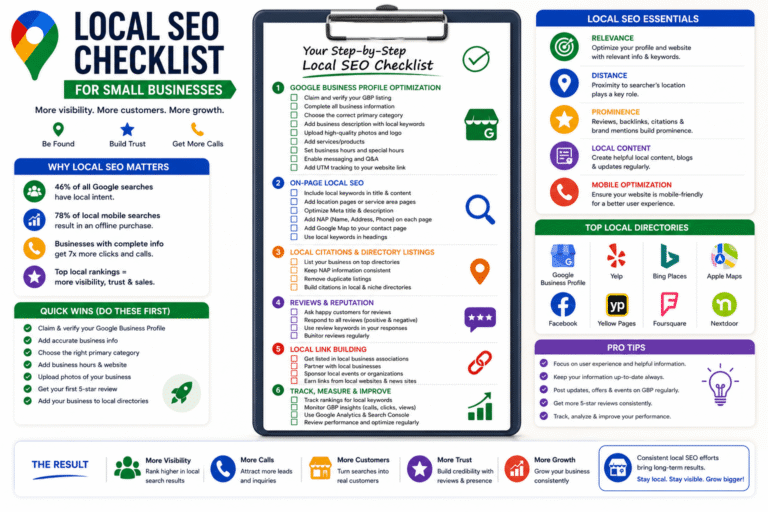
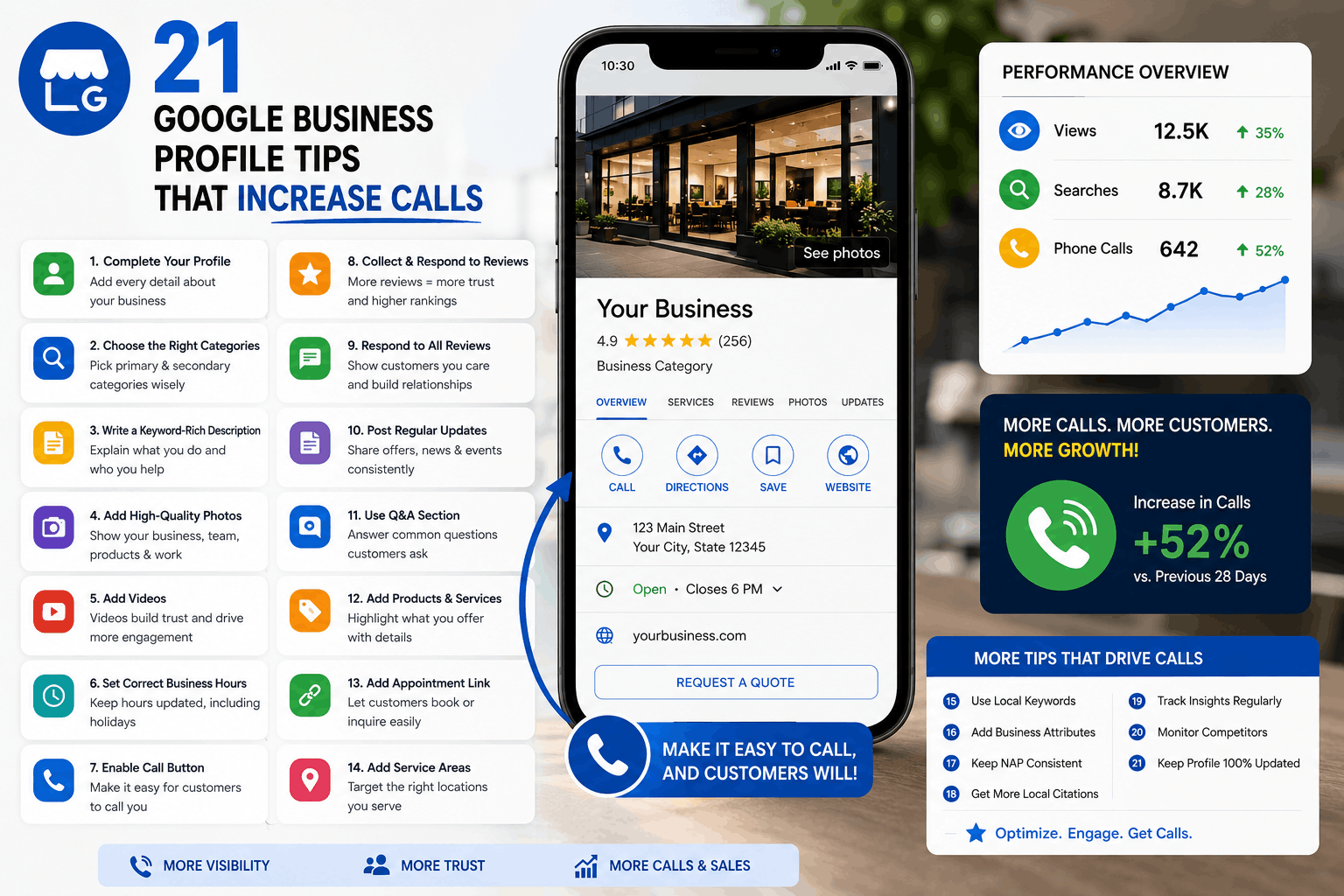
21 Google Business Profile Tips That Increase Calls

Introduction
For many local businesses, Google Business Profile is the single biggest source of inbound leads.
Not Facebook.
Not Instagram.
Not even paid ads.
When someone searches:
- “electrician near me”
- “best dentist in Chicago”
- “emergency plumber open now”
they usually want immediate help.
That means they are highly likely to call directly from Google Maps.
This is why businesses with optimized Google Business Profiles often generate a steady flow of phone calls without spending heavily on advertising.
An optimized profile improves:
- Visibility on Google Maps
- Trust
- Click-through rates
- Customer confidence
- Call conversions
The businesses ranking at the top of Google Maps are usually not there by accident. They consistently optimize their profiles, generate reviews, upload fresh content, and create strong local SEO signals.
This guide covers 21 highly actionable Google Business Profile tips that can help increase calls, improve rankings, and generate more local leads.
Why Calls Matter in Local SEO
Local Searches Have High Buying Intent
Local searches are extremely valuable because users are often ready to take action immediately.
Someone searching:
- “roof repair near me”
- “urgent care clinic”
- “locksmith open now”
usually needs fast help.
These searches convert much better than general website traffic.
Mobile Searches Drive Immediate Actions
Most local searches happen on mobile devices.
Google makes it incredibly easy for users to:
- Tap to call
- Request directions
- Book appointments
Reducing friction increases conversions dramatically.
Phone Calls Convert Better Than Many Ad Channels
Calls often convert better than:
- Display ads
- Social media traffic
- Generic website visitors
Why?
Because callers already trust Google’s recommendations.
If your business appears prominently with strong reviews, users are much more likely to contact you directly.
The 21 Google Business Profile Tips That Increase Calls
1. Choose the Right Primary Category
Your primary category is one of the strongest Google Business Profile ranking factors.
Google uses it to understand what your business actually does.
Example
Bad category:
- “Consultant”
Better category:
- “HVAC Contractor”
Specific categories improve relevance.
Why It Works
Correct categorization helps your listing appear for the right searches.
Practical Steps
- Study top competitors
- Use the most accurate category
- Avoid overly broad categories
Pro Tip
Changing the primary category can significantly impact rankings within days.
2. Add Secondary Categories Strategically
Secondary categories help Google understand additional services.
Example
A dental clinic may add:
- Cosmetic Dentist
- Emergency Dental Service
- Pediatric Dentist
Why It Works
It expands keyword relevance without stuffing.
Common Mistake
Adding irrelevant categories just to chase more traffic.
3. Use a Real Business Name
Avoid keyword stuffing your business name.
Bad Example
“Best Emergency Plumber Dallas 24/7 Cheap Plumbing”
Best Practice
Use your real-world business name consistently.
Why It Works
Google aggressively suspends spammy listings.
Trust and compliance matter long-term.
4. Write a Conversion-Focused Business Description
Most businesses waste this section.
Your description should:
- Explain what you do
- Mention locations
- Build trust
- Encourage action
Example
“ABC Pest Control provides same-day termite, rodent, and pest removal services across Houston. Our licensed technicians offer residential and commercial pest solutions backed by 15 years of experience.”
Why It Works
Good descriptions improve trust and conversions.
5. Add Services and Products Properly
The services section helps Google understand your offerings.
Add:
- Detailed service names
- Descriptions
- Pricing when possible
Why It Works
More service relevance = more visibility.
Pro Tip
Create separate services for each major offering.
6. Upload High-Quality Photos Regularly
Photos directly impact engagement.
Businesses with active photo uploads often receive:
- More calls
- More clicks
- Higher trust
Upload:
- Team photos
- Before/after work
- Vehicles
- Storefront images
- Customer experience photos
Why It Works
Users trust real businesses with authentic visuals.
7. Add Videos to Build Trust
Videos are massively underused.
Short videos can showcase:
- Work quality
- Team professionalism
- Customer experience
Example
A landscaper showing a completed backyard transformation.
Why It Works
Video builds credibility quickly.
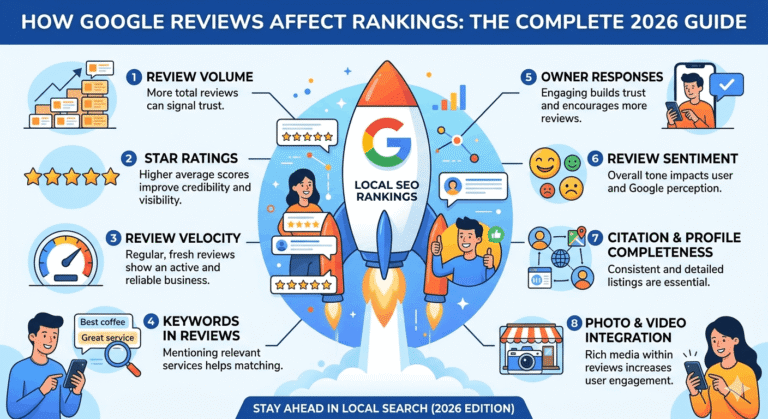
8. Get More Google Reviews Consistently
Reviews strongly influence both rankings and conversions.
Why Reviews Matter
Customers compare:
- Review quantity
- Recency
- Overall rating
- Detailed experiences
Practical Strategy
Ask for reviews immediately after successful service completion.
Pro Tip
SMS review requests convert extremely well.
9. Respond to Every Review
Most businesses ignore review responses.
That’s a mistake.
Why It Works
Responses show:
- Professionalism
- Activity
- Customer care
Google also sees engagement signals.
10. Use Keywords Naturally in Review Responses
Do this carefully and naturally.
Example
“Thank you for choosing our emergency AC repair service.”
Why It Works
It reinforces topical relevance.
Common Mistake
Over-optimizing responses unnaturally.
11. Enable Messaging
Many users prefer messaging instead of calling immediately.
Benefits
- Faster lead capture
- Better engagement
- Additional conversion channel
Pro Tip
Respond quickly.
Slow replies reduce trust.
12. Add Appointment & Booking Links
Reduce friction whenever possible.
Integrations
- Calendly
- Booking software
- Reservation tools
Why It Works
The easier you make it to contact you, the more leads you generate.
13. Keep Business Hours Accurate
Incorrect hours frustrate users badly.
Why It Matters
Nothing destroys trust faster than:
- Closed stores marked open
- Wrong operating times
Pro Tip
Update temporary changes immediately.
14. Add Holiday Hours in Advance
Holiday searches spike heavily.
Businesses that update holiday hours improve:
- Customer trust
- User experience
- Call conversions
15. Publish Weekly Google Posts
Google Posts help keep your listing fresh.
Post Ideas
- Promotions
- New services
- Events
- Tips
- Seasonal offers
Why It Works
Fresh activity improves engagement.
16. Optimize the Q&A Section
Most businesses ignore Q&A completely.
Huge missed opportunity.
Add Questions Like:
- “Do you offer same-day service?”
- “Do you provide free estimates?”
- “Do you work weekends?”
Why It Works
It answers objections before users call.
17. Build Local Citations Consistently
Citations are mentions of your business online.
Examples
- Yelp
- Justdial
- Bing Places
- Apple Maps
- Industry directories
Why It Works
Consistent citations improve local trust signals.
18. Improve Your Website’s Local SEO
Your website strongly affects Google Maps rankings.
Important Elements
- Local keywords
- Fast loading speed
- Mobile optimization
- Local landing pages
- Schema markup
Pro Tip
Your GBP and website should reinforce each other.
19. Earn Local Backlinks
Local backlinks still matter heavily.
Good Sources
- Local blogs
- Community websites
- Sponsorships
- News mentions
- Local organizations
Why It Works
Backlinks increase authority and prominence.
20. Use Call Tracking Correctly
Many businesses avoid call tracking because of SEO concerns.
Proper setup avoids issues.
Best Practice
- Use your primary number as the secondary number
- Maintain NAP consistency
Why It Works
Call tracking helps measure ROI accurately.
21. Monitor Insights & Optimize Continuously
Google Business Profile optimization is not a one-time task.
Monitor:
- Calls
- Direction requests
- Search visibility
- Photo views
- Website clicks
Why It Works
Small improvements compound over time.
Bonus Strategies to Increase Calls Further
Create Hyperlocal Landing Pages
Instead of only targeting cities, target neighborhoods too.
Example
- “Emergency Plumber in Richmond”
- “HVAC Repair in Downtown Austin”
Hyperlocal pages often rank faster.
Create Local Service Pages
Dedicated service pages improve topical authority.
Example:
- Water Heater Repair
- Drain Cleaning
- AC Installation
Improve Behavioral Signals
Encourage actions like:
- Calls
- Direction requests
- Clicks
- Engagement
Listings with stronger user interactions often rank better.
Optimize CTR (Click-Through Rate)
Better CTR improves visibility.
Improve:
- Photos
- Reviews
- Business descriptions
- Offers
Increase Branded Searches
Branded searches signal trust.
Strategies
- Social media marketing
- Community sponsorships
- Offline branding
- PR campaigns
Optimize for AI Search
AI-driven search is growing rapidly.
Focus On:
- FAQs
- Natural language
- Entity SEO
- Detailed business information
Optimize for Voice Search
Voice searches are highly local.
Example Queries
- “Best chiropractor near me”
- “Emergency locksmith open now”
Use conversational content naturally.
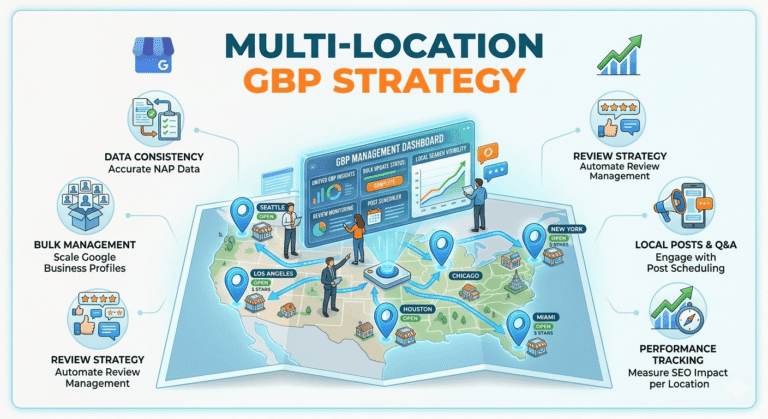
Multi-Location Optimization
For multi-location businesses:
- Create unique profiles
- Build unique landing pages
- Generate reviews per location
Never duplicate content.
Common Google Business Profile Mistakes That Reduce Calls
Wrong Phone Number
One incorrect digit can destroy lead flow.
Fake Reviews
Fake reviews create massive long-term risks.
Google is getting better at detecting review spam.
Low-Quality Images
Blurry photos reduce trust instantly.
Inconsistent NAP
Your Name, Address, and Phone Number should match everywhere online.
Ignoring Reviews
Unanswered negative reviews reduce conversions.
Spammy Descriptions
Over-optimized profiles look untrustworthy.
Duplicate Listings
Duplicate profiles confuse Google and users.
Incomplete Profiles
Missing details reduce visibility and conversions.
Google Business Profile Ranking Factors Explained
Relevance
How closely your business matches the search query.
Distance
How close your business is to the searcher.
Prominence
How authoritative and trusted your business appears online.
Engagement Signals
Google measures:
- Calls
- Clicks
- Direction requests
- Photo engagement
Reviews
Reviews impact:
- Rankings
- Trust
- Conversion rates
Website Authority
Strong websites support stronger GBP rankings.
Local Links
Local backlinks increase prominence.
User Interactions
Listings with higher engagement tend to perform better over time.
Recommended Weekly GBP Optimization Routine
| Task | Frequency |
| Upload new photos | Weekly |
| Publish Google Posts | Weekly |
| Respond to reviews | Daily |
| Request reviews | Ongoing |
| Check business hours | Weekly |
| Monitor calls | Weekly |
| Review competitors | Monthly |
| Add fresh Q&A | Monthly |
| Analyze GBP insights | Monthly |
Frequently Asked Questions
How do I increase calls from Google Business Profile?
Focus on reviews, categories, photos, local SEO, and consistent profile activity.
Do Google reviews increase calls?
Yes. Reviews improve trust and conversion rates significantly.
How often should I post on GBP?
At least once weekly is ideal.
What is the best category for GBP?
Use the most specific category that accurately describes your business.
Do photos help Google Maps rankings?
Photos improve engagement and trust, which indirectly supports rankings.
Can I use call tracking numbers?
Yes, if implemented correctly while maintaining NAP consistency.
How long does GBP optimization take?
Many businesses see improvements within 1–3 months.
Does website SEO affect Google Maps rankings?
Absolutely. Strong local SEO improves GBP performance.
Are keywords in reviews important?
Yes, natural keyword mentions can strengthen relevance.
Can fake reviews hurt rankings?
Yes. They can trigger penalties and damage trust.
What causes Google Business Profile suspensions?
Keyword stuffing, fake addresses, spam edits, and guideline violations are common causes.
How important are Google Posts?
Posts improve freshness, engagement, and user activity.