How Google Reviews Affect Rankings: The Complete 2026 Guide
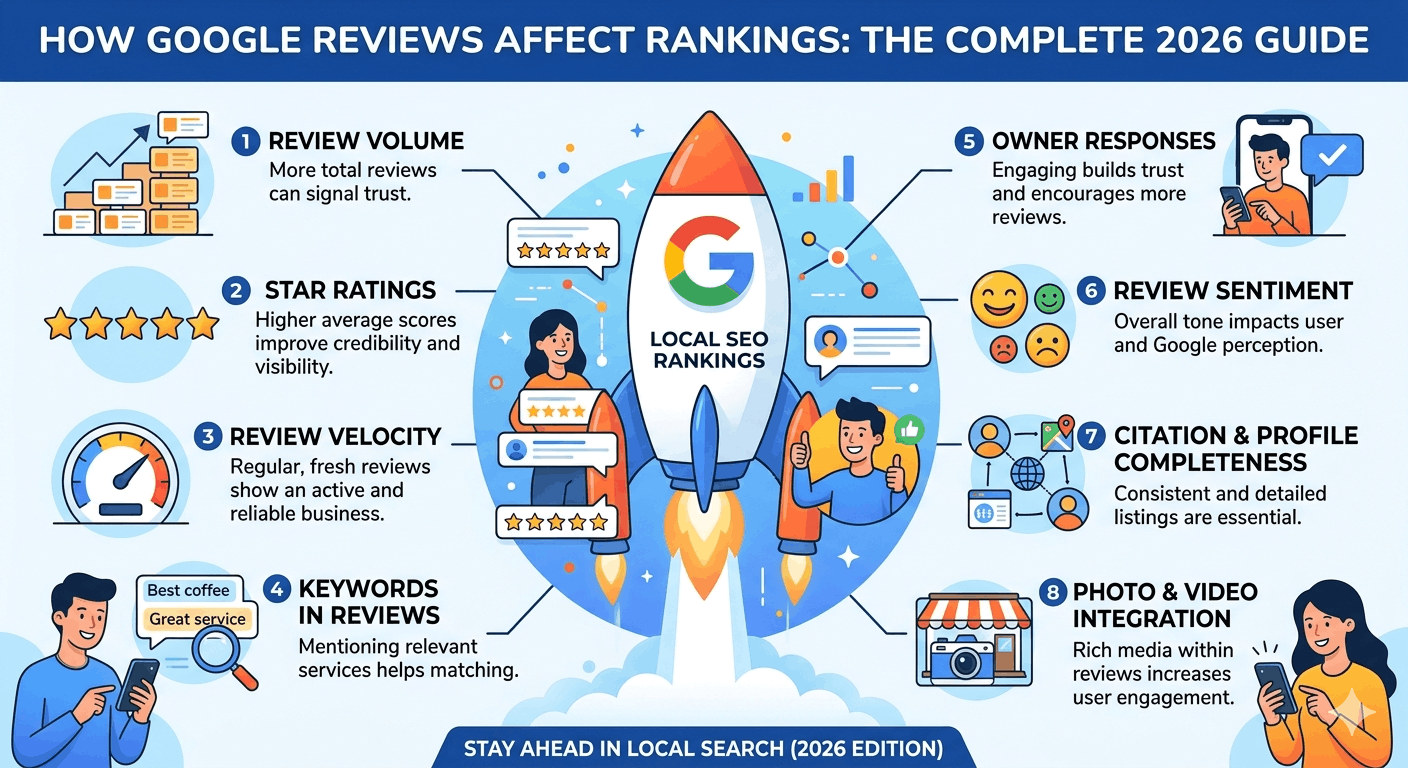

Google reviews are one of the most visible trust signals in local search — and yes, they influence your rankings. But not in a simple ‘more reviews = higher rank’ equation. Review quantity, recency, star rating, response rate, keyword themes and sentiment all play different roles within Google’s local ranking algorithm — which also weighs relevance, proximity and overall website authority.
In this guide you will learn exactly which review signals matter, how they interact with Google Maps and the local 3-Pack, how AI search tools use review data, and how to build a sustainable review strategy that drives both rankings and conversions.
💡 Internal link opportunity: Link ‘local ranking algorithm’ to your ‘Google Local Ranking Factors’ article.
Quick Answer: Do Google Reviews Affect Rankings?
Yes — Google reviews are a significant component of the ‘Prominence’ pillar in Google’s local ranking algorithm. They influence local search visibility both directly (as a ranking signal) and indirectly (through engagement signals like click-through rates and calls). Review quality matters more than quantity alone — a profile with 30 detailed, recent reviews and a 4.7-star average will typically outrank a profile with 200 old, thin reviews and a 3.9-star average.
| Review Signal | How It Affects Rankings | Impact Level |
| Review Quantity | Boosts prominence score — more reviews = stronger local authority | 🔴 High |
| Average Star Rating | Influences click-through rate and trust — below 4.0 stars harms conversions | 🔴 High |
| Review Recency | Fresh reviews signal active business — older reviews decay in influence | 🟠 High |
| Review Velocity | Sudden spikes trigger spam filters; consistent growth is rewarded | 🟠 High |
| Keywords in Reviews | Reinforce category relevance — naturally occurring service/location terms help | 🟡 Moderate |
| Owner Responses | Engagement signal; response rate and speed influence prominence score | 🟡 Moderate |
| Review Sentiment | Positive sentiment analysis correlates with higher local pack visibility | 🟡 Moderate |
| Review Diversity | Reviews across GBP, Facebook, Yelp and industry sites diversify trust | 🟢 Supporting |
How Google’s Local Ranking System Works
Google uses three core factors to determine which businesses appear in the local 3-Pack and Google Maps results:
Relevance
Does your business match what the searcher is looking for? Your GBP category, business description, services, and the keywords that appear naturally in your reviews all contribute to relevance. When customers mention ’emergency plumber’ or ‘best sushi’ in their reviews, those terms reinforce your topical relevance for those queries.
Distance
How close is your business to the searcher’s location or the location they specified in the query? You cannot directly control distance, but optimizing service areas and creating hyperlocal landing pages helps you rank across a wider geographic footprint.
Prominence
How well-known and trusted is your business across the web? This is where reviews carry significant weight. Your total review count, average rating, review recency, response rate and the overall sentiment of your reviews all contribute to your prominence score. Backlinks, citations and website authority also factor in here.
💡 Key insight: Reviews are primarily a Prominence signal — but the keywords customers use in their reviews also contribute to Relevance. This dual role makes review management more valuable than most businesses realise.
Which Review Signals Matter Most?
Review Quantity
A higher review count signals that many customers have engaged with your business — a proxy for popularity and trustworthiness. However, quantity alone without quality is ineffective. Aim to consistently outpace your direct local competitors on review volume.
Review Recency
Google’s algorithm weights recent reviews more heavily than older ones. A business with 10 reviews in the past 30 days will often outperform one with 100 reviews from two years ago. Recency signals that your business is active and currently serving customers well.
Average Star Rating
Your star rating affects both your Google Maps ranking and, critically, your click-through rate in search results. Businesses with a rating below 4.0 stars see significantly lower engagement even when they rank well. Most consumers will not consider a business rated below 4.2 stars.
Review Velocity
The pace at which you accumulate reviews matters. A sudden spike of 30 reviews in one day (common after a mass email blast) can trigger Google’s spam detection and cause reviews to be filtered. A consistent cadence — four to eight reviews per month — is far more sustainable and trustworthy to Google’s systems.
Review Diversity
Reviews across multiple platforms (Apple Maps, Yelp, Facebook, industry-specific directories) signal broader brand authority and provide a more complete trust picture to both Google and prospective customers. Don’t put all your review effort into GBP alone.
Owner Responses
Responding to reviews is an active engagement signal. Google’s own guidance notes that businesses that respond to reviews are seen as more credible. Response rate and response time are tracked — aim to respond to every review within 24 to 48 hours.
Keywords in Reviews
When customers naturally mention your services, location, or specialisations in their reviews, those terms reinforce your keyword relevance for related searches. You cannot and should not tell customers what to write — but you can prompt them by mentioning the specific service they received when requesting a review.
Review Sentiment
Google’s natural language processing analyses the sentiment in review text. Overwhelmingly positive sentiment correlates with higher local pack visibility. Recurring negative themes — even in otherwise high-rated profiles — can suppress rankings for specific service queries.
| Signal | Best Practice | Common Mistake |
| Quantity | Build steadily toward top-competitor count; set monthly targets | Mass-requesting reviews all at once from your email list |
| Recency | Aim for 2–4+ new reviews per month minimum | Letting review velocity drop to zero for 3+ months |
| Star Rating | Maintain above 4.2 stars; address service issues proactively | Ignoring recurring complaint themes in reviews |
| Velocity | Consistent weekly or fortnightly cadence is ideal | Sudden burst of 20 reviews in one day after an event |
| Keywords | Don’t ask customers to use keywords — let them write naturally | Templated review prompts that generate near-identical text |
| Responses | Reply within 24–48 hours; personalise every response | Copy-pasting the same response to every positive review |
| Sentiment | Act on negative patterns immediately; resolve root causes | Arguing with reviewers or deleting negative feedback |
| Diversity | Encourage reviews on Apple Maps, Yelp and industry directories | Only focusing on GBP and ignoring all other platforms |
How Reviews Influence Google Maps Rankings
The local 3-Pack is the most competitive real estate in local search. Reviews influence your presence there in several interconnected ways:
- Higher review counts and ratings push your prominence score above competitors with similar relevance and proximity scores.
- A strong star rating (4.5+) dramatically increases click-through rates from Map results — Google interprets high CTR as a positive engagement signal that reinforces your ranking.
- Active review response signals that your business is engaged and customer-focused, which Google’s algorithm treats as a quality indicator.
- Keyword-rich reviews help Google understand exactly which services you provide and where you provide them — strengthening your relevance for specific query types.
Example: A landscaping company in Melbourne with 180 reviews at 4.7 stars and 90% response rate will consistently outrank a competitor with 40 reviews at 4.4 stars and no responses — even when both businesses have similar websites and categories. The review profile is the tiebreaker.
How Reviews Affect Conversions Beyond Rankings
Even when reviews don’t directly shift your ranking position, they dramatically influence what happens after a customer finds you:
- 93% of consumers say online reviews influence their purchase decisions (BrightLocal Consumer Survey).
- Businesses with a 4-star or above rating receive 12× more calls than businesses with a 3-star rating.
- Adding a star to your rating can increase revenue by 5–9%, according to Harvard Business School research.
- 80% of searchers trust online reviews as much as personal recommendations.
- Review snippets displayed in search results increase click-through rates by up to 15%.
✅ The conversion impact of reviews is often larger than the ranking impact. A business in position 4 with a 4.9-star rating and 200 reviews will frequently generate more leads than a position 1 business with a 3.8-star rating.
Google Reviews and AI Search Results
In 2026, AI-powered search tools — Google AI Overviews, Gemini, ChatGPT, and Perplexity — are increasingly using review data to form recommendations and entity associations. Here is how reviews influence each:
Google AI Overviews and Gemini
Google’s AI systems analyse review sentiment and entity associations to determine which businesses to feature in AI-generated local answers. A business with consistently positive, keyword-rich reviews across multiple platforms is more likely to be cited in AI Overviews than one with thin or inconsistent review profiles.
ChatGPT and Perplexity
These AI tools pull local business data from Google Maps, Yelp, TripAdvisor and other indexed platforms. Your review profile — star rating, review themes, response quality — forms the data layer that these tools use to assess whether your business is worth recommending.
What to do:
- Maintain review profiles on Google, Apple Maps, Yelp and any industry-relevant directory — AI tools aggregate data across platforms.
- Ensure your review sentiment consistently reflects your core value propositions.
- Respond to reviews in a way that also communicates your expertise and services — these responses are indexed and can be cited.
- Add FAQPage and LocalBusiness schema to your website to create a complete entity footprint that supports AI citations.
💡 Internal link opportunity: Link ‘AI Overviews’ to your ‘How to Rank in Google AI Overviews’ guide.
How to Get More Google Reviews Ethically
Buying reviews, incentivising reviews or faking reviews all violate Google’s policies and can result in GBP suspension. Here is a proven ethical acquisition process:
Step 1: Ask at the right moment
Request a review immediately after a positive service interaction — this is when customer satisfaction is highest. For service businesses, this is at job completion. For retail, it is post-purchase. For hospitality, it is at checkout.
Step 2: Use a direct review link
Create a short, direct Google review link using Google’s Place ID Finder and shorten it with a URL shortener. Send this link directly — never make customers search for your business to leave a review.
Step 3: Create QR codes
Print your review QR code on receipts, invoices, business cards, and in-store signage. A QR code on a completed job invoice generates reviews while the experience is still fresh.
Step 4: Train your team
Brief every customer-facing staff member on how and when to ask for reviews. A simple verbal prompt at the end of an interaction — ‘We would really appreciate it if you could share your experience on Google’ — converts at a surprisingly high rate.
Step 5: Follow up once
If a customer did not leave a review after initial contact, a single polite SMS or email follow-up within 72 hours can recover 20–30% of missed opportunities. Do not follow up more than once.
Step 6: Simplify the process
The more steps required to leave a review, the fewer customers complete it. Every additional click reduces completion rate by approximately 15%. Your review link should take customers directly to the review form with zero friction.
⚠️ Review gating — only asking satisfied customers for reviews — is explicitly prohibited by Google’s guidelines and the FTC. Always ask all customers, not just those you believe had a positive experience.
How to Respond to Reviews for SEO Benefits
How you respond to reviews is a measurable SEO signal. Use the following framework:
| Review Type | Response Strategy | SEO Benefit |
| 5-Star Positive | Thank by name, mention the specific service, add a relevant keyword naturally, invite them back | Reinforces category keywords; boosts engagement signals |
| 3–4 Star Neutral | Acknowledge feedback positively, address any specific concern mentioned, offer to follow up offline | Shows responsiveness; recovers potential trust loss |
| 1–2 Star Negative | Acknowledge calmly, apologise for their experience, take conversation offline, never argue or deflect | Demonstrates professionalism to all future readers |
| Fake / Spam Review | Report via GBP dashboard; respond professionally while flagging that the experience cannot be verified | Protects brand reputation; signals active management |
Response SEO best practices:
- Mention the specific service provided: ‘We’re glad our bathroom renovation team exceeded your expectations in [Suburb].’
- Include your business name naturally in at least some responses — this helps Google associate review text with your entity.
- Keep responses between 50–100 words for positive reviews; be more thorough for negative ones.
- Never use the same response template repeatedly — identical responses signal inauthentic engagement.
- Respond within 24 hours — response speed is tracked and displayed in some GBP profiles.
Common Review Mistakes That Hurt Rankings
- Buying fake reviews — Google detects unnatural patterns and can suspend your profile permanently.
- Review gating — filtering out negative reviewers violates Google’s policies and the FTC’s guidelines on endorsements.
- Mass review requests sent to your entire email list simultaneously — velocity spikes trigger spam filters, causing reviews to be removed.
- Ignoring negative reviews — unanswered negative reviews damage trust for every future reader and signal inactivity to Google.
- Posting reviews from the same IP address or device — Google identifies this as manipulation and removes the reviews.
- Offering discounts, gifts, or payment in exchange for reviews — any form of incentive violates both Google’s and FTC guidelines.
- Using staff members to leave reviews — identified via account patterns and treated as fake reviews.
Review Benchmarks by Industry
Use these benchmarks to assess where your review profile stands relative to competitive expectations in your sector:
| Industry | Avg Rating | Competitive Review Count | Response Rate Target | Review Velocity |
| Restaurants | 4.2–4.6 ★ | 150–500+ | 80%+ responses | 8–15/month |
| Healthcare | 4.4–4.9 ★ | 50–200+ | 90%+ responses | 4–8/month |
| Real Estate | 4.5–5.0 ★ | 30–100+ | 95%+ responses | 2–4/month |
| Home Services | 4.3–4.8 ★ | 50–300+ | 75%+ responses | 4–10/month |
| Retail Stores | 4.0–4.5 ★ | 50–250+ | 65%+ responses | 4–8/month |
| Legal Services | 4.5–5.0 ★ | 20–80+ | 95%+ responses | 2–3/month |
| Beauty / Salons | 4.4–4.9 ★ | 80–300+ | 70%+ responses | 6–12/month |
💡 Benchmark note: These are indicative ranges based on competitive local markets in major Australian cities. Smaller regional markets typically require lower review counts to be competitive.
How to Track Review Performance
Tracking review metrics alongside local ranking data reveals whether your review strategy is actually moving the needle. Monitor these KPIs monthly:
| KPI | Where to Track It | Frequency | Target |
| Review Growth Rate | GBP Insights / BrightLocal | Monthly | 5%+ MoM |
| Average Star Rating | GBP Dashboard | Weekly | ≥ 4.3 stars |
| Response Rate | GBP Insights / Semrush Local | Weekly | ≥ 90% |
| Response Time | GBP Dashboard | Weekly | < 24 hours |
| Local Pack Visibility | Local Falcon / BrightLocal | Monthly | Top 3 in Maps |
| GBP Clicks (Website) | GA4 with UTM / GBP Insights | Monthly | Track MoM growth |
| Call Volume from GBP | GBP Insights / CallRail | Monthly | Track MoM growth |
| Review Keyword Themes | Manual audit / BrightLocal | Quarterly | Match core services |
Recommended Tracking Tools
| Tool | Primary Use for Review Management | Cost |
| GBP Manager | Native review monitoring, response management, insights | Free |
| BrightLocal | Review tracking across 80+ platforms, response workflows, white-label reporting | From $39/mo |
| Whitespark | Review acquisition widgets, monitoring, citation + review audits | From $33/mo |
| Semrush Local | Review monitoring, listing management, local ranking correlation | From $50/mo |
| Local Falcon | Geo-grid ranking tracker to correlate review changes with Maps rank shifts | From $24/mo |
| Grade.us / NiceJob | Automated review request sequences via SMS and email | From $75/mo |
| Google Search Console | Track local keyword impression changes correlated with review growth | Free |
Pro Tips for Review Management
- ☑ Set a monthly review target — e.g. 5 new reviews per month minimum — and assign accountability to a team member
- ☑ Create a ‘Review Response Template Library’ with 10–15 varied response frameworks to ensure consistency without repetition
- ☑ Use Local Falcon monthly to create a geo-grid heatmap — correlate ranking changes with periods of review growth
- ☑ Audit your 1-star and 2-star reviews quarterly for recurring themes — they reveal operational improvements that will lift your overall rating
- ☑ Add your Google review link to your email signature, WhatsApp business profile, and SMS follow-up messages
- ☑ For multi-location businesses, track review performance per location — a network-wide 4.6 star average can hide a single underperforming site
- ☑ Check competitor review counts and recency monthly — if they are growing faster than you, adjust your acquisition cadence
- ☑ Never delete your responses — Google indexes them. A thoughtful response to a negative review often converts more future customers than the negative review deters
Frequently Asked Questions About Google Reviews and SEO
Schema opportunity: Implement FAQPage schema for all questions and answers below.
1. How many Google reviews do I need to rank in the local 3-Pack?
There is no universal number — it depends entirely on your competitors. Research the top three ranked businesses in your category and location, note their review counts, and set your target at their level or above. In most Australian capital city suburbs, 30–80 reviews is a starting competitive baseline.
2. Does a higher star rating always lead to better rankings?
Not always. Star rating is a conversion signal as much as a ranking signal. A business with 4.2 stars and 150 reviews will often outrank one with 4.9 stars and 8 reviews, because review volume and recency also factor into prominence scoring.
3. Do negative reviews hurt my Google rankings?
A handful of negative reviews among a large positive volume has minimal ranking impact. However, if your overall rating drops below 4.0 stars, your click-through rate declines sharply — which itself is a negative engagement signal. Address service issues proactively to keep your rating above 4.2 stars.
4. Does Google count reviews from other platforms (Yelp, Facebook)?
Directly, no — Google primarily counts GBP reviews for its ranking algorithm. Indirectly, yes — reviews on Yelp, Facebook and industry directories contribute to your overall online prominence, which influences Google’s trust assessment. They also feed AI search tools that aggregate cross-platform data.
5. Can I remove a fake or unfair Google review?
You cannot delete reviews yourself. You can flag a review as violating Google’s policies through the GBP dashboard and request removal. Provide a clear, factual explanation of why the review violates policy. While responding professionally to the review publicly.
6. How long does it take for new reviews to affect rankings?
Review signals are typically reflected in local rankings within 2–8 weeks. However, compounding effects — where consistent review growth leads to ranking improvements — typically become measurable over a 3–6 month period.
7. Does responding to reviews help SEO?
Yes. Response rate is a tracked engagement signal. Google’s own documentation states that businesses which respond to reviews are ‘seen as more credible.’ Response keywords are also indexed and can contribute to keyword relevance signals.
8. Is it against Google’s rules to ask customers for reviews?
No — asking for reviews is perfectly acceptable and encouraged. What is prohibited is: incentivising reviews with discounts or gifts, review gating (only asking satisfied customers), and posting reviews on behalf of customers.
9. How do I get more Google reviews without paying for them?
Ask at the peak satisfaction moment, use a direct review link (not a search prompt), train your team to make verbal requests, add QR codes to invoices and receipts, and follow up once via SMS or email within 72 hours. Consistency beats any single tactic.
10. Can keyword-stuffed review responses hurt my rankings?
Yes. Unnaturally keyword-stuffed review responses read as spam to both Google’s algorithms and human readers. Use keywords naturally in context — for example, mentioning the specific service and location — rather than forcing them into every response.
Conclusion: Reviews Are a Long-Term Ranking Asset
Google reviews are not a quick-win tactic — they are a compounding, long-term local SEO asset. The businesses that dominate Google Maps in their category are almost always those that have built a consistent, sustainable review acquisition process and maintain it month after month.
Key takeaways:
- Review quality, recency and consistency matter more than raw quantity alone.
- Reviews contribute to Prominence — and the keywords in reviews also reinforce Relevance.
- Respond to every review within 24–48 hours; response rate is a tracked signal.
- Never buy, fake or gate reviews — the short-term gain is not worth the permanent suspension risk.
- In 2026, AI search tools use review data extensively — a strong cross-platform review presence matters more than ever.
- Track review performance monthly alongside local ranking data to measure the real impact.
Your competitors are earning reviews right now. Every week without a review acquisition process is a week they are building an advantage that compounds over months.
🚀 Want a review acquisition strategy tailored to your business? Our local SEO team builds ethical, sustainable review systems that drive both rankings and revenue. [Internal link: Book a Free Local SEO Audit]