GBP Suspension Recovery: How to Reinstate Your Google Business Profile Fast

Disclaimer: Google’s GBP policies, suspension criteria and reinstatement processes change regularly. Always check the current Google Business Profile Help Centre for the most up-to-date guidance before submitting any appeal.
A suspended Google Business Profile can stop your phone calls, leads and walk-in traffic overnight. If your GBP has been suspended, the fastest path to reinstatement is to identify the root cause, fix every violation, gather solid documentation, and submit a single well-prepared appeal — not multiple rushed ones.
Suspensions are becoming more common as Google tightens its spam filters and quality controls. But the good news is that the vast majority of suspended profiles can be fully reinstated when the right process is followed.
In this guide you will learn exactly why GBP suspensions happen, how to audit your profile, what documents to gather, how to submit a successful reinstatement request, and how to avoid suspension in the future.
💡 Internal link opportunity: Link ‘Google Business Profile’ to your ‘What is GBP?’ explainer article.
Quick Answer: How Do You Recover a Suspended GBP?
To recover a suspended Google Business Profile: identify the cause using GBP notifications and Google’s guidelines, fix all policy violations, audit your NAP and profile content, gather supporting business documentation, and submit one reinstatement request through Google’s official appeal form. Wait 5–7 business days before following up.
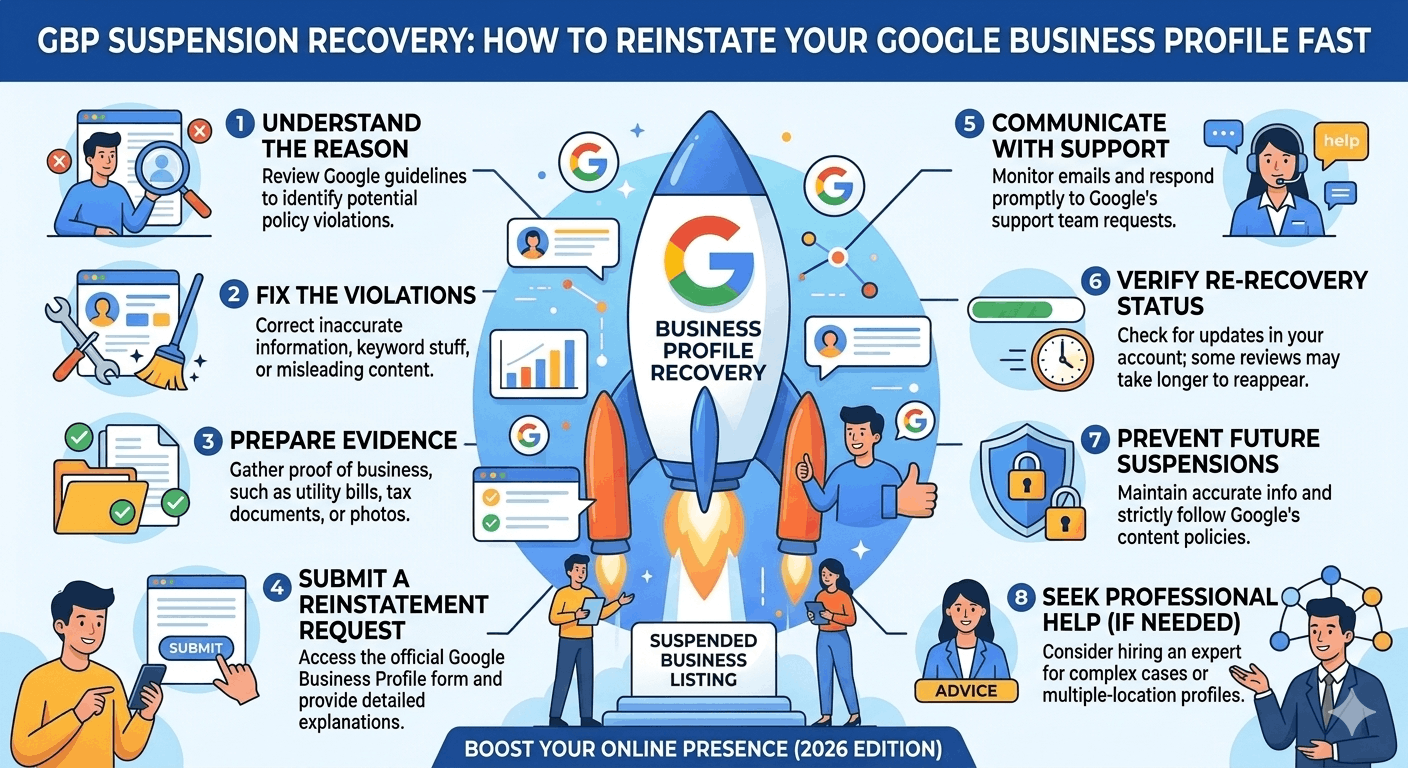
| Step | Action | Tool / Resource | Priority |
| 1 | Identify root cause — review GBP guidelines & email notifications | GBP Dashboard + Google Policy page | 🔴 First |
| 2 | Fix all guideline violations before submitting any appeal | GBP Manager | 🔴 Critical |
| 3 | Audit NAP consistency across all citations | BrightLocal / Whitespark | 🟠 High |
| 4 | Gather business documentation (registration, photos, lease) | Physical + scanned docs | 🟠 High |
| 5 | Submit reinstatement request via Google’s official form | business.google.com/appeal | 🔴 Critical |
| 6 | Wait 5–7 business days before any follow-up | — | 🟡 Patient |
| 7 | Respond to Google’s information requests within 48 hours | Email / GBP Dashboard | 🔴 Critical |
| 8 | Escalate to Google Business Profile support if denied twice | support.google.com/business | 🟡 If needed |
Understanding GBP Suspensions
Not all GBP suspensions are the same. Google applies two main types depending on the severity of the issue:
| Suspension Type | What Happens | Recovery Difficulty |
| Soft Suspension | Profile still visible in Maps but owner loses management access — cannot edit, post or respond to reviews | 🟡 Moderate — usually resolved via verification |
| Hard Suspension | Profile removed from Google Maps entirely — invisible to searchers. All reviews and data may be lost | 🔴 Hard — requires full reinstatement appeal |
Regardless of the type, a suspension immediately impacts your local SEO. Your business disappears from or becomes inaccessible in Google Maps, your rankings drop to zero for local searches, and any review engagement, Q&A management or posting access is frozen. For service-based businesses, this can mean a near-total loss of inbound leads within 24 hours.
Why Google Suspends Business Profiles
Understanding the specific cause of your suspension is the most critical step. An appeal submitted without fixing the underlying issue will almost always be denied. Here are the most common causes:
| Suspension Cause | Why It Triggers Google | How to Fix It |
| Keyword stuffing in business name | Violates GBP name guidelines | Remove all keywords not part of your legal name |
| Virtual office / co-working address | No genuine staffed presence at the address | Switch to a real office or hide address as SAB |
| Duplicate listings | Multiple profiles for same location confuse Google | Merge or remove duplicate listings before appealing |
| Incorrect business category | Category doesn’t match actual business activity | Update to most accurate primary category |
| Inconsistent NAP information | Name/Address/Phone mismatch across web signals ineligibility | Audit all citations and enforce exact NAP match |
| Service area violations | SAB displaying a physical address they shouldn’t show | Hide physical address, define service areas correctly |
| Suspicious profile edits | Rapid changes to name, category or address trigger spam filters | Revert edits, wait, then make changes slowly |
| Competitor spam reports | Third-party flags can trigger automated suspensions | Submit reinstatement with strong evidence |
| Ineligible business type | Businesses without customer-facing operations are ineligible | Review GBP eligibility policy; may need to remove listing |
Keyword Stuffing in Business Names
Adding descriptive words or location keywords to your GBP business name (e.g., ‘Joe’s Plumbing Sydney Emergency 24/7’) directly violates Google’s guidelines. Your profile name must match your real-world trading name exactly.
⚠️ Google can suspend and permanently remove profiles that repeatedly keyword-stuff their business name. Fix this before appealing — it is the most common suspension trigger.
Virtual Offices and Co-Working Spaces
GBP requires a genuine, staffed physical location. Virtual office addresses, mail forwarding services, and co-working hot desks where your business has no dedicated, regular presence are not eligible. If this applies to you, either secure a genuine office or convert your listing to a service-area business and hide the address.
Duplicate Listings
Multiple GBP profiles for the same business at the same address confuse Google’s spam detection. Before submitting any reinstatement request, find and either merge or permanently remove all duplicate listings.
💡 Use Google Maps to manually search your business name and address to locate any duplicate or unclaimed profiles.
Suspicious Profile Edits
Rapidly changing your business name, address or category — even for legitimate reasons — can trigger Google’s automated spam filters. If this caused your suspension, revert the changes and wait 72 hours before attempting any further edits.
Competitor Spam Reports
Third-party users and competitors can report your GBP profile. While Google reviews these reports, a high volume of reports can trigger an automated suspension. Your best response is a strong, well-documented reinstatement appeal — not engaging with competitors directly.
How to Audit Your Suspended Profile
Before you submit any appeal, run through this pre-reinstatement audit:
- ☑ Read Google’s GBP guidelines in full at support.google.com/business — note anything your profile may violate
- ☑ Check your business name — does it exactly match your legal or trading name with no extra keywords?
- ☑ Verify your listed address is a real, staffed, customer-accessible location
- ☑ Confirm your primary category is the most specific and accurate option available
- ☑ Search for your business on Google Maps to identify any duplicate listings
- ☑ Check NAP consistency — run your business name through BrightLocal or Whitespark to find citation mismatches
- ☑ Review your GBP photos — remove any that are stock images, watermarked, or irrelevant to your business
- ☑ Check your website — does the NAP on your site exactly match your GBP?
- ☑ Review any recent edits made to your profile — did any rapid changes precede the suspension?
- ☑ Check your GBP notification emails for any specific policy violation messages from Google
Documents You May Need for Reinstatement
Google will almost always request supporting documentation for hard suspensions. Preparing these in advance dramatically speeds up your appeal. Here is what you may need:
| Document Type | Accepted Examples | Quality Requirements |
| Business Registration | ASIC certificate, ABN/ACN registration, articles of incorporation | Clear scan, matching business name & address |
| Business Licence | Council permit, industry licence, operating licence | Must show business name and premises address |
| Lease / Tenancy Agreement | Commercial lease, signed rental agreement | Must include address, business name and current date range |
| Utility Bill | Electricity, gas, internet or phone bill | Business name + physical address, dated within 3 months |
| Insurance Certificate | Public liability, professional indemnity | Shows trading name and business address |
| Tax Documents | BAS statement, tax invoice, ATO correspondence | Must match name and address on GBP |
| Storefront Photos | Exterior showing street number + permanent signage | Clear, well-lit, taken within the last 90 days |
| Interior / Staff Photos | Reception area, staff at work, branded materials | Shows genuine business operations in progress |
✅ Best practice: Prepare a single PDF pack containing all documents in the order listed above. Name the file clearly: ‘[BusinessName]_GBP_Reinstatement_Evidence.pdf’. This makes Google’s review process easier and faster.
Step-by-Step GBP Suspension Recovery Process
Step 1: Identify the Root Cause
Check your GBP dashboard notification emails, the ‘Issues’ tab in GBP Manager, and compare your profile against Google’s current guidelines. Do not guess — knowing the exact cause is essential before proceeding.
Step 2: Correct All Violations
Fix every issue you identified before submitting your appeal. If your business name contains keywords, remove them. If your address is a virtual office, either get a real one or convert to a service-area business. Never submit an appeal before fixing the root cause.
⚠️ Submitting an appeal while your profile still contains violations is the #1 reason reinstatement requests are denied.
Step 3: Gather Supporting Evidence
Assemble your documentation pack (see Section 6). Every document should show your exact business name and address as listed on your GBP. Any mismatch between your documents and your GBP information will result in rejection.
Step 4: Submit the Reinstatement Request
Go to the official GBP reinstatement form at business.google.com/appeal. Fill in every required field, upload your documentation, and write a concise, factual explanation of your business and why your profile complies with Google’s guidelines. Do not include opinions or complaints — keep it factual.
💡 In your appeal message, briefly explain: what your business does, how customers visit or access your services, and that you have reviewed and corrected all potential guideline violations.
Step 5: Monitor the Appeal
After submission, check your registered Gmail account for any updates. Google typically responds within 3–10 business days but timelines vary. Do not submit additional appeals while your first is under review — this resets the queue.
Step 6: Respond to Additional Requests
Google may ask for additional documentation via email. Respond within 48 hours with clear, high-quality scans or photos. Delays in response extend your reinstatement timeline significantly.
Step 7: Escalate If Necessary
If your appeal is denied after two attempts, escalate through the Google Business Profile Help Community or contact GBP support directly at support.google.com/business. Reference your appeal case number and provide new or additional evidence in each escalation.
How Long Does GBP Reinstatement Take?
Timelines vary depending on the complexity of the violation and the quality of your documentation. Here is what to expect:
| Scenario | Typical Timeframe | Factors That Speed Recovery |
| Simple soft suspension (name/hours edit) | 3–7 business days | Strong docs, clear violation fix, no repeat offenses |
| Address or category violation | 7–14 business days | Matching NAP, business registration matches address |
| Virtual office / eligibility issue | 2–6 weeks | Physical proof of genuine presence at location |
| Duplicate listing issue | 7–21 business days | Merge or remove duplicates before appeal |
| Competitor spam report | 1–3 weeks | Counter-evidence, strong documentation |
| Hard suspension (complex case) | 3–8 weeks or more | Legal entity docs, lease, storefront photos, escalation |
| Second appeal after denial | Add 2–4 weeks | New evidence, different angle, policy citation |
Do not follow up before the 5–7 business day mark. Submitting multiple appeals or contacting support too early puts your case back to the end of the review queue.
Common Reinstatement Mistakes to Avoid
- Submitting multiple reinstatement requests simultaneously — this resets the review clock every time
- Continuing to make profile edits while an appeal is pending — triggers additional flags
- Uploading poor-quality, blurry or unreadable document scans — Google will reject these immediately
- Not fixing the root cause before appealing — a pristine appeal with an uncorrected violation is always denied
- Contacting Google support before 7 business days have passed — premature escalation delays resolution
- Using a different Gmail account to submit your appeal than the one linked to your GBP — creates identity mismatch
- Writing emotional or accusatory appeal messages — keep every communication factual and professional
How to Prevent Future GBP Suspensions
- ☑ Conduct a GBP compliance audit every quarter using Google’s current guidelines
- ☑ Maintain an organised folder of all business documents (registration, lease, licence) for fast retrieval
- ☑ Subscribe to Google’s GBP help updates so you know when policy changes occur
- ☑ Make profile changes slowly — no more than one significant change per week
- ☑ Limit GBP management access to trained team members only — revoke ex-employee access immediately
- ☑ Monitor your GBP dashboard weekly for any new warnings, suggested edits or user-reported changes
- ☑ Set up a Google Alert for your exact business name to catch any third-party edits or reports
- ☑ Never use a shared or virtual address — always maintain a genuine physical or properly-defined service area
Multi-Location GBP Recovery Tips
For franchise operators, agencies and enterprise brands managing multiple locations, GBP suspension recovery requires an additional layer of planning:
| Scenario | Recommended Action |
| Franchise / chain suspension | Treat each location independently; audit each profile individually before submitting bulk appeals |
| Bulk verification failure | Use Google’s bulk verification spreadsheet; ensure each location has unique, verified address data |
| Multiple simultaneous suspensions | Triage by revenue impact; resolve highest-value locations first with dedicated documentation per site |
| Shared address across locations | Ensure each profile has a distinct suite or unit number; use department or practitioner names where possible |
| Agency managing client GBPs | Ensure Business Groups (previously Agencies) access is granted, not ownership transfer |
💡 Internal link opportunity: Link to your ‘Local SEO for Franchise Businesses’ guide here.
Real Recovery Examples
The following case studies are based on common GBP suspension patterns. Business names are illustrative.
| Business | Cause | Actions Taken | Timeline | Outcome |
| Sydney plumber (SAB) | Displayed physical address when they should have been address-hidden | Removed address, redefined service areas, submitted reinstatement with ABN registration | 9 days | ✅ Reinstated |
| Brisbane café | Business name contained ‘Best Coffee Brisbane’ keyword | Reverted to trading name, removed keyword, uploaded council permit + lease | 6 days | ✅ Reinstated |
| Melbourne law firm | Competitor submitted mass spam reports; hard suspension | Submitted legal entity docs, building lease, exterior photos; escalated to Google support | 31 days | ✅ Reinstated |
| Perth multi-location dental | Rapid bulk edits to 8 locations triggered spam filter | Reverted all edits, submitted reinstatement per location with individual evidence packs | 18 days avg | ✅ All reinstated |
Common thread across all successful reinstatements: the root cause was identified and fixed before the appeal was submitted, and documentation was prepared as a complete, professional package.
When to Hire a GBP Specialist
Most soft suspensions can be resolved by following this guide. But there are situations where hiring an experienced GBP recovery specialist is worth every dollar:
| Situation | Why a Specialist Helps |
| Two or more reinstatement denials | Specialists identify root causes that owners miss and craft stronger appeals with legal-grade documentation |
| High-revenue listing (clinic, franchise, law firm) | Every day offline costs real money — a specialist compresses the recovery timeline |
| Multi-location business (5+ profiles) | Governance, documentation and bulk appeal processes require structured workflows |
| Competitor attack / spam report suspected | Specialists know how to build counter-evidence and escalation paths within Google |
| Profile suspended multiple times | Recurring suspensions signal a deeper compliance gap a specialist can identify and fix permanently |
✅ A good GBP specialist will diagnose the root cause, prepare your documentation, write your appeal, and manage the follow-up process — giving your profile the best possible chance of reinstatement.
💡 Internal link opportunity: Link to your ‘Local SEO Services’ or ‘GBP Management’ service page here.
Frequently Asked Questions About GBP Suspension Recovery
Schema opportunity: Implement FAQPage schema for all questions and answers below.
1. How do I know if my Google Business Profile has been suspended?
You will either see a ‘Suspended’ badge in your GBP Manager dashboard, or your profile will disappear from Google Maps entirely. You may also receive a notification email to your registered Google account.
2. Will my reviews be lost when my GBP is suspended?
Reviews are not immediately deleted during a suspension. In most cases, reinstated profiles recover their reviews. However, if a profile is permanently removed, review recovery is not guaranteed.
3. Can I create a new GBP listing while my old one is suspended?
No. Creating a new listing while an existing suspended profile exists is a direct violation of GBP policies and will almost certainly result in both profiles being suspended or removed.
4. How many times can I appeal a GBP suspension?
There is no hard limit, but each appeal should include new or stronger evidence. Submitting identical appeals repeatedly signals to Google that you have nothing new to add and may damage your case.
5. Can a competitor get my GBP suspended?
Yes. Competitors can file user reports that trigger Google’s automated review system. While Google investigates, your profile may be temporarily suspended. A strong reinstatement appeal with solid documentation is your best response.
6. Does GBP suspension affect my organic search rankings?
A GBP suspension does not directly affect your organic (non-Maps) search rankings. However, you will lose all Google Maps and local 3-Pack visibility, which significantly reduces overall local search traffic.
7. What is the reinstatement form URL for GBP?
The official reinstatement request form is located at business.google.com. Navigate to your suspended profile and click the ‘Appeal’ button, or search ‘GBP reinstatement request’ in the Google Business Profile Help Centre.
8. What happens if my reinstatement request is denied?
Review Google’s denial response carefully — it often contains clues about what additional evidence is needed. Fix any remaining issues, gather stronger documentation, and submit a new appeal. After two denials, consider escalating to Google support or engaging a GBP specialist.
9. Can I manage my business while my GBP is suspended?
For a soft suspension, you may still be able to access your dashboard but cannot make public-facing changes. For a hard suspension, your profile is removed and management is fully locked. In both cases, avoid making any profile edits until your appeal is processed.
10. Is GBP suspension the same as being blacklisted by Google?
No. A GBP suspension is a policy enforcement action and is reversible in most cases. It does not affect your ability to run Google Ads, use other Google products, or have organic search rankings.