Free Google Review QR Code Generator

Introduction
Google reviews can directly influence whether customers choose your business or your competitor.
When people search for:
- “restaurant near me”
- “best dentist in Sydney”
- “plumber nearby”
- “top-rated realtor”
they almost always compare:
- Ratings
- Review counts
- Recent customer experiences
before taking action.
This means reviews impact:
- Google Maps rankings
- Trust
- Click-through rates
- Calls
- Bookings
- Walk-ins
- Sales
The challenge?
Many happy customers never leave reviews simply because the process feels inconvenient.
That’s where a Google review QR code becomes incredibly powerful.
Instead of asking customers to:
- Search for your business
- Find your profile
- Click the review button manually
you can let them scan a QR code and leave a review instantly.
It removes friction completely.
And in local SEO, reducing friction often increases conversions dramatically.
This guide explains exactly how to create a free Google review QR code, which tools work best, where businesses should use QR codes, and how review QR codes can improve Google Maps rankings and customer trust.
What Is a Google Review QR Code?
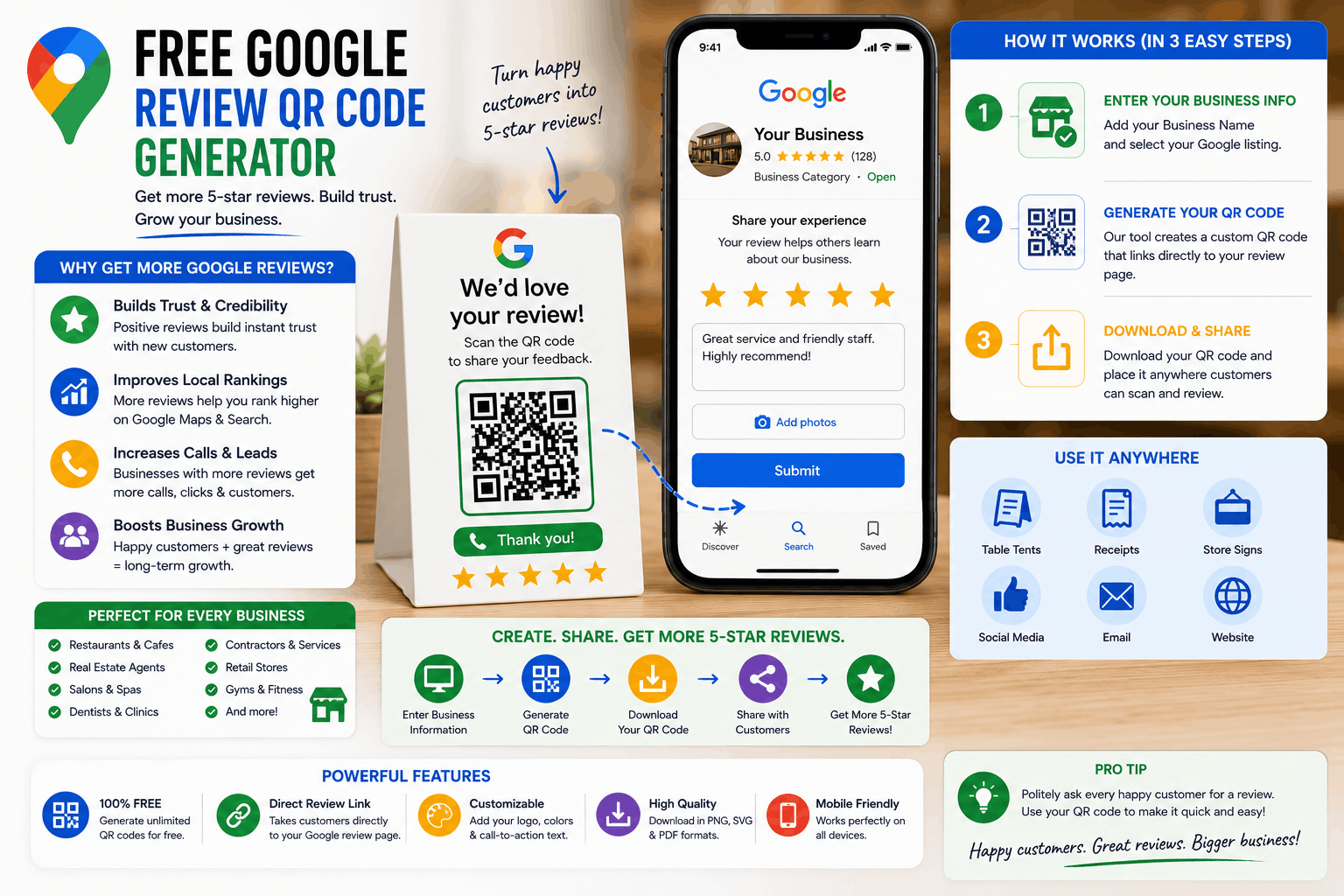
A Google review QR code is a scannable QR code that sends customers directly to your Google review page.
When customers scan the QR code using their smartphone camera:
- It opens your Google Business Profile review form
- Customers can leave a review immediately
This makes the review process much faster and easier.
How It Works
The QR code simply contains:
- Your Google review link
Instead of typing URLs manually, customers scan and review instantly.
Connection Between QR Codes & Google Business Profile Reviews
Google Business Profiles allow businesses to generate direct review links.
A QR code simply turns that review link into a scannable shortcut.
Why Mobile-First Review Collection Matters
Most customers now interact with businesses on mobile devices.
QR codes work especially well because:
- Smartphones scan instantly
- No typing is required
- The review process becomes frictionless
This increases review completion rates significantly.
Benefits of Using a Google Review QR Code
Easier Review Collection
The easier you make reviews, the more reviews you usually receive.
Higher Review Conversion Rates
Reducing steps improves completion rates dramatically.
Faster Customer Actions
Customers can leave reviews in seconds instead of minutes.
Improved Local SEO
Google reviews are strong local ranking signals.
More reviews can improve:
- Google Maps visibility
- Local Pack rankings
- Trust signals
Better Customer Experience
Convenience improves participation.
Increased Trust & Credibility
Businesses with strong review profiles often convert more customers.
More Google Maps Visibility
Review velocity and engagement support local prominence.
How to Create a Free Google Review QR Code
Step 1: Find Your Google Review Link
Desktop Instructions
- Open your Google Business Profile
- Click “Ask for Reviews”
- Copy the review link
Mobile Instructions
- Open Google Maps or GBP app
- Access your business profile
- Tap “Customers”
- Tap “Reviews”
- Select “Share Review Form”
Step 2: Generate the QR Code
Paste the review link into a QR code generator.
Step 3: Test the QR Code
Always scan the QR code using multiple devices before printing.
Common Mistake
Businesses often print broken or outdated QR codes without testing them.
Step 4: Download the QR Code
Export:
- PNG
- SVG
depending on your use case.
Step 5: Print & Use the QR Code
Place QR codes strategically where customers naturally interact with your business.
Common Troubleshooting Tips
| Problem | Solution |
| QR code not scanning | Increase print size |
| Wrong landing page | Verify review URL |
| Slow loading | Test mobile internet speed |
| Blurry printing | Use high-resolution export |
| Too much visual clutter | Simplify design |
Best Free Google Review QR Code Generator Tools
Google Chrome QR Generator
Features
- Built into Chrome
- Fast and simple
- Free
Pros
- No signup required
- Easy to use
Cons
- Limited customization
Best For
Quick review QR codes.
Canva
Features
- QR code integration
- Design templates
- Branding customization
Pros
- Great for printed materials
- Strong visual design tools
Cons
- Some features require paid plans
Best For
Restaurants, retail stores, and branded marketing materials.
QR Code Monkey
Features
- Custom QR designs
- Logo support
- High-resolution downloads
Pros
- Very flexible
- Free
Cons
- More advanced interface
Best For
Professional printed QR campaigns.
Bitly
Features
- Short links
- Tracking
- Analytics
Pros
- Click tracking
- Cleaner URLs
Cons
- QR customization limitations
Best For
Businesses wanting analytics.
Beaconstac
Features
- Dynamic QR codes
- Analytics
- Enterprise features
Pros
- Advanced tracking
- Multi-location support
Cons
- Premium pricing for advanced features
Best For
Marketing agencies and large businesses.
QR.io
Features
- Dynamic QR management
- Analytics
- Custom branding
Pros
- Easy updates
- Marketing flexibility
Cons
- Paid features scale quickly
Best For
Growing businesses with evolving campaigns.
Flowcode
Features
- QR analytics
- Branded QR experiences
Pros
- User-friendly
- Good design flexibility
Cons
- Premium features limited in free plans
Best For
Modern marketing-focused brands.
Comparison Table
| Tool | Best For | Free Version | Analytics |
| Chrome | Quick setup | Yes | No |
| Canva | Branding | Yes | Limited |
| QR Code Monkey | Customization | Yes | Limited |
| Bitly | Link tracking | Yes | Yes |
| Beaconstac | Agencies | Partial | Advanced |
| QR.io | Dynamic QR | Partial | Yes |
| Flowcode | Marketing | Partial | Yes |
Where Businesses Should Use Review QR Codes
Receipts
Retail stores and restaurants can add QR codes directly to receipts.
Packaging
Delivery businesses should place review QR codes inside packaging.
Table Tents
Restaurants can place review prompts directly on tables.
Storefronts
Window signage works surprisingly well.
Business Cards
Real estate agents and consultants can add review QR codes to cards.
Menus
Restaurants can include QR review prompts near the bottom of menus.
Flyers
Local service businesses can include QR codes on promotional materials.
Invoices
Tradies and home service businesses often generate strong review response rates through invoices.
Email Signatures
Simple but effective.
SMS Campaigns
SMS combined with QR codes performs extremely well.
WhatsApp Messages
Particularly effective in mobile-first markets.
Waiting Rooms
Medical clinics and dentists can use waiting room signage effectively.
Delivery Packaging
Food delivery businesses should heavily use packaging inserts.
Industry-Specific QR Code Strategies
Restaurants
Best placements:
- Tables
- Bills
- Menus
- Delivery bags
Dentists
Use:
- Reception desks
- Appointment cards
- Follow-up emails
Real Estate Agents
Include QR codes in:
- Open house brochures
- Closing folders
- Business cards
Medical Clinics
Use review QR codes:
- After successful visits
- At checkout counters
Gyms
Place QR codes:
- Reception area
- Locker rooms
- Welcome emails
Retail Stores
Use:
- Receipts
- Packaging
- Counter displays
Home Service Businesses
Use:
- Service invoices
- Vans
- Leave-behind cards
Hotels
Hotels can place review QR codes:
- In rooms
- Reception desks
- Checkout emails
How QR Codes Help Google Maps Rankings
Review Velocity
QR codes increase review frequency.
Consistent review growth supports rankings.
Customer Engagement
More reviews improve engagement signals.
Behavioral Signals
Reviews influence:
- Click-through rates
- Calls
- Trust
- Conversions
Trust Signals
Businesses with strong reviews appear more trustworthy.
Local Prominence
Reviews strongly influence prominence in Google Maps rankings.
Conversion Optimization
Strong review profiles improve conversion rates significantly.
Common Google Review QR Code Mistakes
Linking Incorrectly
Always test review links before printing.
Broken QR Codes
Low-quality printing often breaks scannability.
Asking Too Aggressively
Avoid pressuring customers excessively.
Incentivizing Reviews Improperly
Do not offer rewards specifically for positive reviews.
Poor Placement
QR codes hidden in low-visibility areas perform poorly.
Low-Quality Print Materials
Blurry QR codes reduce usability.
Not Testing Mobile Experience
Always test on multiple devices.
Advanced Review Generation Strategies
SMS Automation
Automated SMS review requests can scale review growth significantly.
Email Automation
Email workflows work well for:
- Medical clinics
- Agencies
- B2B businesses
AI-Assisted Review Management
AI tools can help:
- Monitor sentiment
- Draft responses
- Track patterns
Reputation Management Workflows
Build repeatable review-generation systems.
Multi-Location Review Systems
Each location should use:
- Unique review links
- Unique QR codes
CRM Integrations
CRMs can automate review requests after customer interactions.
Dynamic QR Codes
Dynamic QR codes allow future URL updates without reprinting.
UTM Tracking
Track:
- QR scans
- Conversions
- Traffic sources
using UTM parameters.
How AI Search Is Changing Online Reviews
AI Overviews
Google increasingly summarizes review sentiment automatically.
Conversational Search
Users now search conversationally:
- “Best café with friendly staff nearby.”
Reviews help AI systems understand reputation.
Review Sentiment Analysis
AI evaluates:
- Positive sentiment
- Customer experiences
- Recurring themes
Trust Signals
Strong reviews reinforce entity trust.
Entity Reputation
Businesses with consistent positive reviews build stronger authority.
Future of Local SEO Reviews
Reviews will likely become even more important in AI-driven local search.
Recommended Weekly Review Growth Workflow
| Task | Frequency |
| Request reviews | Daily |
| Respond to reviews | Daily |
| Monitor QR scans | Weekly |
| Test QR codes | Weekly |
| Update review materials | Monthly |
| Analyze review trends | Monthly |
| Train staff | Monthly |
| Audit review workflows | Quarterly |
Frequently Asked Questions
What is a Google review QR code?
A QR code that sends customers directly to your Google review form.
How do I create a free Google review QR code?
Copy your Google review link and paste it into a QR code generator.
Are Google review QR codes free?
Yes, many tools offer free QR code generation.
Do QR codes help get more reviews?
Yes. They simplify the process and increase review completion rates.
Can QR codes improve Google Maps rankings?
Indirectly, yes. More reviews can strengthen local SEO signals.
What’s the best QR code generator?
It depends on your needs. Canva and QR Code Monkey are popular free options.
Should businesses use dynamic QR codes?
Dynamic QR codes offer better flexibility and tracking.
Where should restaurants place QR review codes?
Tables, menus, receipts, and delivery bags work well.
Can QR codes track scans?
Some QR platforms provide scan analytics.
How big should QR codes be?
Large enough for reliable scanning from normal viewing distance.
Can QR codes break?
Yes, poor printing or incorrect URLs can cause problems.
Are QR review requests allowed by Google?
Yes, as long as you follow Google review guidelines.
Should businesses incentivize reviews?
Avoid incentivizing specifically positive reviews.
Do reviews affect local SEO?
Absolutely. Reviews strongly influence Google Maps rankings and trust.
How often should businesses request reviews?
Consistently after positive customer interactions.